Kai Social is an AI chat application designed for users who want to interact with artificial intelligence through a simple conversational interface. The app can be used for everyday questions, writing, brainstorming, studying, summarising information, and general conversations.
Depending on the current service and release, Kai may provide access to different AI models. Available models and features can change over time as the service is updated.
Because Kai relies on online AI processing, an active internet connection is required for sending requests and receiving responses.
In this guide, we will explain what Kai Social does, how it works, its main features, how to use it, how to install the APK on Android, and some important safety points to know before using a third-party APK.
Kai Social APK Details
| Information | Details |
|---|---|
| App Name | Kai Social |
| Category | Social |
| Developer | Dow Labs, LLC |
| Platform | Android |
| Version | 0.7.7 |
| Size | 46 MB |
| Android Requirement | Check the specific release |
| Internet | Required |
| App Type | AI Chat |
| Package Name | com.DowLabs.KaiSocial |
| Latest Update | August 23, 2026 |
| Official Source | Google Play |
Note: Version, file size, Android compatibility and available features can change between releases. Always check the information for the specific APK you are installing.
What Is Kai Social APK?
Kai Social is an AI-powered chat application built around conversational interactions. Users can enter questions, instructions or ideas into the chat interface and receive an AI-generated response.
The app can be useful for many everyday tasks. For example, you can ask it to explain a topic, generate ideas, improve writing, summarise information or continue a conversation with follow-up questions.
The exact AI models and features available through Kai can change depending on the current release and service configuration.
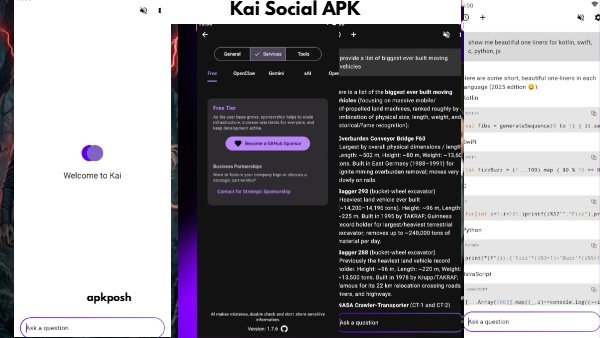
How Does Kai Social Work?
Kai Social works through an online AI service. You enter a question or instruction in the chat interface, and the request is processed by the available AI service before a response is returned.
The conversational format allows you to continue asking questions without starting a completely new conversation each time.
For example, you can ask Kai to explain a topic and then request:
- A simpler explanation
- More examples
- A shorter summary
- Additional details
- A different writing style
- Follow-up questions
Since AI processing takes place online, an active internet connection is required.
Also Check: Lifestack APK Download for Android – AI Planner, Features & Guide
AI Chat Interface
The main Kai Social experience is based around conversation.
You can type a question, instruction or idea into the chat box and send it to the available AI service. After receiving a response, you can continue the conversation with additional questions or instructions.
This multi-turn approach can be useful when working on tasks that require several steps.
Access to AI Models
Kai may provide access to different AI models through the same application.
Information associated with earlier versions of the service mentions models such as Llama and Google Gemini. However, model availability can change over time.
If you are specifically interested in a particular AI model, check the current app interface or official listing before relying on its availability.
Writing Assistance
Kai can be used as a writing assistant for a variety of everyday tasks.
You can ask the AI to:
- Generate ideas
- Improve sentences
- Rewrite text
- Create outlines
- Summarise content
- Explain difficult wording
- Brainstorm topics
- Create drafts
AI-generated content should still be reviewed before publishing or submitting it because AI responses can contain mistakes or unsuitable information.
Study and Learning
Students and general users can use an AI chat application to get explanations about different subjects.
For example, you can ask Kai to explain a difficult concept in simpler language, provide examples, summarise a topic or help you understand a question.
However, AI-generated answers should not automatically be considered correct. Important academic or technical information should be checked against reliable sources.
Brainstorming
Kai can also be useful when you need new ideas.
You can use the chat interface to brainstorm:
- Content ideas
- Project concepts
- Study plans
- Writing topics
- Business ideas
- Questions
- Everyday solutions
The quality of the response can depend heavily on the instructions and context you provide.
Summarising Information
Another useful application of AI chat is summarisation.
Users can provide suitable text and ask Kai to shorten it, identify the main points or explain the information in simpler language.
Avoid submitting confidential documents, passwords, financial information or other sensitive material to an online AI service.
Multi-Turn Conversations
Kai supports conversational interactions where users can continue asking questions after receiving an initial response.
For example, you can start with a general question and then ask for more details, examples or a simpler explanation.
This makes the app useful for tasks where you need several related responses instead of a single answer.
Main Features of Kai Social
AI Chat
Interact with an AI service through a simple conversational interface.
Multiple AI Models
The service may provide access to different AI models. Available models can change depending on the current version and service configuration.
Writing Support
Use AI assistance for drafting, rewriting, brainstorming, summarising and other writing tasks.
Study Assistance
Ask questions and request explanations to support general learning.
Summarisation
Shorten suitable text and identify important information.
Brainstorming
Generate ideas for projects, content, studies and everyday tasks.
Follow-Up Questions
Continue a conversation instead of sending every request as a completely separate question.
Online AI Processing
AI requests are processed online, so an active internet connection is required.
How to Use Kai Social APK
Using Kai Social is relatively straightforward:
- Install Kai Social on your compatible Android device.
- Open the application.
- Make sure your device has an active internet connection.
- Select an available AI model if the option is provided.
- Enter your question or request.
- Send the message.
- Read the generated response.
- Ask follow-up questions when you need more information.
- Try another available model if the app provides multiple options.
How to Download Kai Social APK
Before downloading a third-party APK, check the file information carefully.
- Check the version number.
- Confirm the file size.
- Check the package name.
- Make sure the APK is compatible with your Android version.
- Download the file from a source you trust.
- Wait for the download to finish.
- Locate the APK in your Downloads folder.
For the safest installation, users should prefer the official distribution source whenever available.
How to Install Kai Social APK on Android
For a standard APK:
- Download the compatible Kai Social APK.
- Open File Manager.
- Open the Downloads folder.
- Tap the Kai Social APK file.
- If Android requests permission to install apps from that source, review the permission and enable it if you trust the source.
- Tap Install.
- Wait for the installation to complete.
- Open Kai Social.
- Continue with the available account or setup options.
Does Kai Social APK Need an OBB File?
A normal AI chat application does not automatically require an OBB file.
If your Kai Social release contains a standard APK, you can normally install it through Android’s package installer.
Only use separate OBB or additional data files if the specific release has been verified to require them.
Also Check: Character AI APK Download for Android – AI Characters, Chat & Roleplay
Privacy and AI Safety
Because Kai Social uses online AI processing, users should be careful about the information they enter into the app.
Avoid submitting:
- Passwords
- Banking information
- Payment details
- Authentication codes
- Private documents
- Sensitive personal information
AI responses can also contain incorrect, incomplete or outdated information. For important decisions, verify information using reliable sources.
Pros & Cons
Pros
- Simple AI chat interface
- Useful for everyday questions
- Can assist with writing
- Useful for brainstorming
- Can help explain study topics
- Supports conversational follow-up questions
- May provide access to different AI models
- Suitable for a range of general AI tasks
Cons
- Requires an internet connection
- AI responses may contain errors
- Available models can change
- Cloud processing creates privacy considerations
- Some features may depend on server availability
- Third-party APK files can create additional security risks
What’s New in Kai Social APK?
The exact changelog should be matched to the version being published.
AI applications can change their available models, interface and server-side features over time. Therefore, users may see changes in model availability, performance or functionality between releases.
Do not publish a generic “bug fixes and performance improvements” statement as the official changelog unless it matches the actual release notes.
Version Note: Verify the current version, update date, file size and release notes before publishing them as the latest information.
Frequently Asked Questions
What is Kai Social APK?
Kai Social APK is the Android installation package for Kai Social, an AI chat application that allows users to interact with AI through a conversational interface.
Which AI models are available in Kai Social?
Earlier information associated with the service mentions models such as Llama and Google Gemini. However, supported models can change. Check the current application before relying on a specific model being available.
Does Kai Social require an internet connection?
Yes. Kai relies on online AI processing, so an active internet connection is required.
Can Kai Social help with writing?
Yes. You can use Kai for brainstorming, drafting, rewriting, summarising and other writing-related tasks.
Can Kai Social help with studying?
Yes. You can ask questions, request explanations and summarise suitable educational information.
Can Kai Social summarise text?
Yes. You can provide suitable text and ask the AI to shorten it or identify its main points.
Is Kai Social suitable for beginners?
The conversational interface is designed to make AI interaction relatively simple. New users can start with basic questions and gradually explore additional features.
Does Kai Social store my chat history?
Do not assume a specific chat-storage policy without checking the current privacy policy or official documentation. Data-handling practices can change over time.
Is Kai Social APK free?
Availability of free features and any paid options can change. Check the current official listing or in-app information before assuming that all features are free.
Does Kai Social APK require an OBB file?
Not normally for a standard APK installation. Check the actual package before adding or downloading any additional data files.
What is the latest version of Kai Social?
The version covered in this article is 0.7.7. Always verify the current release before describing it as the latest version.
Is Kai Social APK safe?
The safest option is to install Kai Social from its official distribution source. If you use a third-party APK, verify the package, source and permissions and scan the file before installation because unofficial packages can be modified.
What is the package name of Kai Social?
The package name listed for Kai Social is:
com.DowLabs.KaiSocial
Conclusion
Kai Social is an AI chat application aimed at users who want a simple way to interact with artificial intelligence for everyday tasks. It can be useful for questions, writing, brainstorming, studying, summarising and general conversations.
The availability of specific AI models and features can change over time, so users should check the current release before relying on a particular feature. Because the service uses online processing, an internet connection is required, and users should avoid sharing sensitive information in their conversations.
If you install Kai Social through a third-party APK, verify the package, version and source before installation. For the safest option, use the official Google Play release whenever it is available.
4 thoughts on “Kai Social APK Download for Android – AI Chat, Models & Features”