
vidIQ APK is a YouTube and Instagram growth app designed for creators who want to research keywords, find content ideas, check channel analytics, and improve their video and Reel strategy.
The Android app combines AI-powered suggestions with creator analytics and SEO tools. It can help you find video ideas, generate title suggestions, research keywords and hashtags, and monitor channel performance from a mobile device.
vidIQ APK Details
| Details | Information |
|---|---|
| App Name | vidIQ for YouTube & Instagram |
| Latest APK Version | 2.8.7 |
| Size | About 128 MB |
| Android Required | Android 7.0+ |
| Category | Video Players & Editors |
| Developer | vidIQ |
| Package Name | com.vidiq.app |
| File Format | XAPK |
| Price | Free with In-App Purchases |
| Content Rating | Everyone |
| Latest Play Store Update | July 31, 2026 |
APK size can vary by device architecture and package variant.
What Is vidIQ APK?
vidIQ is a creator-focused app for people who publish content on YouTube and Instagram.
Instead of using only a normal video editor, vidIQ focuses more on the research and optimization side of content creation.
You can use it to look for content ideas, understand what is trending, research keywords, check analytics, and get AI-assisted suggestions for your videos and Reels.
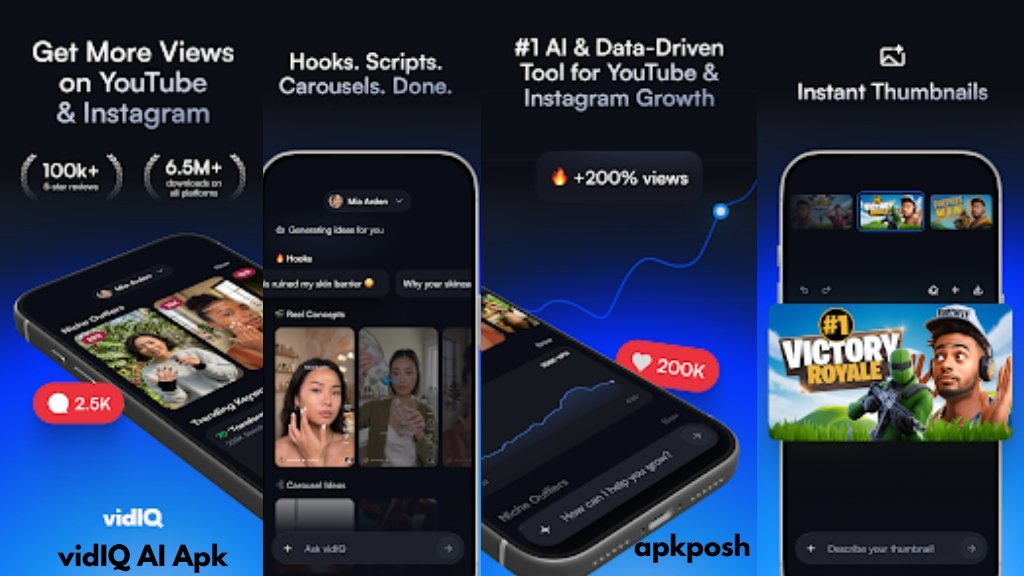
The current Android version also includes Instagram-related tools in addition to its YouTube features.
How Does vidIQ Work?
After installing vidIQ, you can sign in and connect your creator accounts where supported.
The app can then provide tools related to your content strategy, including:
- Find video or Reel ideas.
- Research keywords and hashtags.
- Check channel and content analytics.
- Get AI-assisted title and description suggestions.
- Discover trending content in your niche.
- Review performance and look for areas to improve.
vidIQ also provides a mobile experience for creators who want to manage and optimize their content away from a desktop.
vidIQ APK Features
AI Coach
The AI Coach can provide personalized content ideas, title suggestions and growth-oriented recommendations based on your content strategy.
YouTube Analytics
You can monitor important channel and video performance information from the mobile app.
Keyword Research
vidIQ includes keyword and hashtag research tools that can help creators understand what audiences are searching for.
Video Ideas
The app can suggest content ideas based on your niche and current trends.
Instagram Tools
The newer version also supports Instagram-related features for Reels, posts and strategy.
Title, Description and Tag Suggestions
Creators can use AI-powered suggestions when working on video metadata.
Trending Content
vidIQ can help users discover videos and Reels that are performing well in their niche.
Thumbnail Tools
The app also includes thumbnail-related features and AI suggestions for improving the presentation of video content.
Is vidIQ APK Free?
Yes, vidIQ can be downloaded and used with a Free plan, but some advanced features require a paid subscription.
According to the current Google Play listing, the plans include Free, Boost and Max. The Free plan includes essential tools and a monthly AI credit allowance, while the paid plans provide additional analytics and AI credits.
Android Requirements
Third-party APK information currently lists Android 7.0 or above as the minimum Android requirement for vidIQ version 2.8.7.
Because vidIQ uses online services and account-based features, a working internet connection is also important.
What’s New in vidIQ APK?
Version 2.8.7 introduced features including Daily Reels Coaching, improvements to the AI Coach, support for additional content types and voice dictation, along with performance and accessibility improvements.
The Google Play listing subsequently shows the app updated on July 31, 2026.
Pros & Cons
Pros
- YouTube and Instagram tools in one app
- AI-assisted content ideas
- Keyword and hashtag research
- Channel analytics
- Title and description suggestions
- Useful for Shorts and Reels creators
- Mobile access to creator tools
Cons
- Some advanced features require a paid plan
- Many tools depend on an internet connection
- APK/XAPK variants can have different file sizes
- New users may need some time to understand all the available tools
Who Should Use vidIQ?
vidIQ can be useful for YouTubers, Shorts creators, Instagram creators and people who regularly research content ideas.
It is particularly useful if you want to do more than simply upload videos and want to research topics, keywords, titles, trends and performance from one place.
For someone managing several social-media projects, having these tools on Android can also be more convenient than always opening the desktop version.
Related Apps on APKPosh
If you are interested in creator and social apps, you can also explore:
- Bilibili Apk – another productivity-focused Android app.
- FunEasyLearn APK – a social-focused Android app.
vidIQ APK Download
Before installing an APK or XAPK from a third-party source, check the version number, package name and Android requirement carefully.
The official Google Play listing is the safest place to check the current release and install the app.
Official Google Play
The official package name for vidIQ is:
com.vidiq.app
FAQs
What is vidIQ APK?
vidIQ APK is the Android version of vidIQ, a creator tool that provides YouTube and Instagram analytics, keyword research, AI content ideas and optimization features.
What is the latest vidIQ APK version?
The latest third-party APK listing currently shows version 2.8.7. The Google Play listing shows the app was updated on July 31, 2026.
Does vidIQ work on Android?
Yes. The current APK information lists Android 7.0 and above.
What is the package name of vidIQ?
The package name is com.vidiq.app.
Is vidIQ completely free?
No. There is a free plan, but some advanced features are available through paid plans and in-app purchases.
Can vidIQ help with YouTube Shorts?
Yes. vidIQ provides creator tools for short-form content, including ideas, optimization and trend-related features. Its official help documentation specifically describes the mobile app as useful for Shorts creators.
Does vidIQ support Instagram?
Yes. The current Android app includes Instagram tools for Reels, posts and Instagram strategy.
Final Note
vidIQ is more than a basic YouTube analytics app. Its main purpose is to help creators with the research and optimization work that happens before and after publishing content.
If you create YouTube videos, Shorts or Instagram Reels, the combination of AI ideas, keyword research, analytics and optimization tools can make vidIQ a useful creator companion on Android.